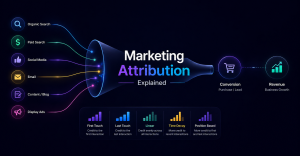


Running a store on WooCommerce gives you full control over your products and sales — but when it comes to understanding where your revenue actually comes from, things get messy very quickly.
Most store owners assume they already have this data. They open their analytics dashboard, look at traffic sources, and think they know which channels are working.
In reality, the picture is often completely distorted.
The Problem
If you run a WooCommerce store, you likely don’t know exactly which channel generates your revenue.
You might see traffic coming from Facebook, Google, email, or direct visits — but that doesn’t mean those sources are correctly tied to actual sales.
The core issue is simple: WooCommerce does not reliably store the original traffic source of a customer.
So when a purchase happens, you often lose the connection between:
- the first interaction
- the marketing channel
- the final revenue
And without that connection, your data becomes guesswork.
Why Data Gets Lost
There are several reasons why attribution breaks in WooCommerce setups, and most of them happen silently in the background.
Session resets are one of the biggest issues. Tracking tools typically rely on sessions, which expire after a period of inactivity. If a user comes back later, they may be treated as a new visitor with a new source.
Cookie limitations also play a major role. Modern browsers, privacy features, and ad blockers restrict tracking cookies, which means some users are only partially tracked — or not tracked at all.
Returning users create another layer of confusion. If someone first visits your site through a paid ad but later comes back directly or through another channel, the original source is often overwritten. As a result, the conversion gets attributed to the wrong source.
All of this leads to one outcome: you lose the real origin of your revenue.
Why Google Analytics Isn’t Enough
Many store owners rely on Google Analytics to solve this problem, but it has serious limitations when it comes to revenue attribution.
By default, Google Analytics uses last-click attribution. This means it gives full credit to the final interaction before a purchase, ignoring everything that happened earlier in the customer journey.
It also struggles with ad blockers and browser restrictions, which can break tracking completely for a portion of your users.
On top of that, it often shows revenue numbers that don’t match your actual WooCommerce data. This mismatch creates confusion and makes it difficult to trust the reports.
So while Google Analytics is useful for understanding traffic patterns, it is not a reliable source of truth for revenue attribution.
The Solution
To accurately track where your sales come from, you need to go beyond default analytics tools and implement a more robust tracking approach.
First, you need first-touch tracking. This means capturing the original UTM parameters when a user first lands on your site and preserving that data.
Second, you need persistent data storage. Instead of relying only on cookies or sessions, the data should be stored in a way that survives across visits and devices — ideally tied to the user or customer record.
Finally, you need to link orders to UTM data. Every purchase should be connected back to the original traffic source, so you can see exactly which channels generate revenue.
When these three elements are in place, you stop guessing and start seeing the real performance of your marketing.
And that’s when you can confidently scale what works — and cut what doesn’t.