

Connect Look at Revenue with your marketing stack
Look at Revenue is built to work with the tools WordPress businesses already use.
The goal is simple: connect traffic sources, leads, orders, customers, and revenue in one attribution flow.
Instead of checking every platform separately, you can see which integrations help turn visitors into real business results.
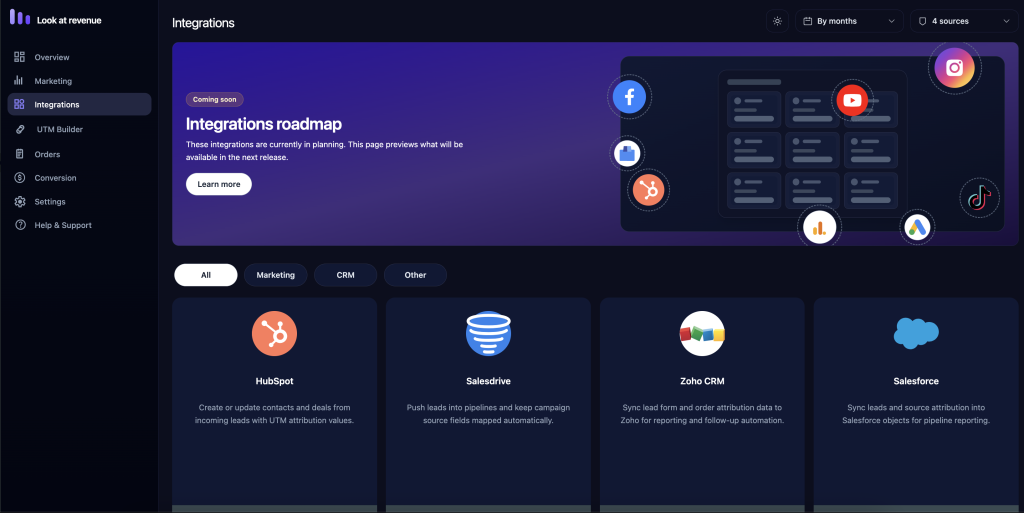
What integrations do
Integrations allow Look at Revenue to connect attribution data with important actions on your website.
Depending on your setup, integrations can help track:
- form submissions
- WooCommerce orders
- subscription purchases
- customer signups
- lead sources
- campaign performance
- revenue by channel
- conversion pages
This helps you understand not only where visitors came from, but what they did after landing on your site.
WooCommerce
WooCommerce integration connects marketing attribution data with real store orders.
When a visitor comes from a campaign and places an order, Look at Revenue can save the source, medium, campaign, referrer, and landing page connected to that order.
This helps you measure:
- revenue by source
- orders by campaign
- average order value by channel
- product sales by campaign
- customer acquisition sources
- paid traffic performance
WooCommerce is one of the main integrations for stores that want to optimize marketing based on revenue instead of clicks.
WooCommerce Subscriptions
If your store uses WooCommerce Subscriptions, Look at Revenue can help connect subscription purchases with their original traffic source.
This is useful for tracking recurring revenue and understanding which campaigns bring long-term customers.
You can use subscription attribution to analyze:
- first subscription payment source
- recurring revenue by campaign
- subscription plan performance
- customer lifetime value by channel
- acquisition source for subscribers
For subscription businesses, this gives a clearer view of which marketing channels bring customers who keep paying.
Contact Form 7
Contact Form 7 integration helps connect form submissions with visitor attribution data.
When a visitor submits a form, Look at Revenue can store the campaign or source that brought the visitor to your website.
This is useful for tracking:
- contact requests
- quote requests
- demo requests
- consultation forms
- lead generation campaigns
- partnership inquiries
Instead of only seeing that a form was submitted, you can understand where that lead came from.
WordPress forms and custom forms
Some websites use custom forms or form plugins beyond Contact Form 7.
Look at Revenue is designed to support flexible lead tracking, but custom forms may require additional setup depending on how the form is built.
Custom form tracking may be useful for:
- newsletter signup forms
- booking forms
- checkout-related forms
- lead capture forms
- CRM-connected forms
- custom React or AJAX forms
If your form is not tracked automatically, developer configuration may be needed.
CRM integrations
CRM integrations help connect website attribution data with sales and customer management workflows.
This can be useful when leads are collected on the website but converted later by a sales team.
CRM attribution can help answer:
- Which campaign generated this lead?
- Which source brought the highest-quality prospects?
- Which leads later became customers?
- Which channels generated the most sales opportunities?
- Which campaigns should receive more budget?
CRM integrations are especially useful for service businesses, agencies, SaaS companies, and B2B teams.
Email marketing tools
Email marketing integrations can help track campaigns from newsletters, product launches, promotions, and automated email flows.
By using UTM parameters in email links, Look at Revenue can connect email traffic with leads, orders, and revenue.
Recommended UTM structure for email campaigns:
utm_source=newsletter
utm_medium=email
utm_campaign=monthly_offer
This helps separate email performance from other channels and makes reports easier to understand.
Paid advertising platforms
Look at Revenue can track traffic from paid advertising platforms when campaign links include UTM parameters.
This can include platforms such as:
- Google Ads
- Facebook Ads
- Instagram Ads
- TikTok Ads
- LinkedIn Ads
- YouTube campaigns
- influencer campaigns
- affiliate campaigns
For best results, always add clear UTM parameters to your ad URLs.
Example:
https://yourwebsite.com/?utm_source=facebook&utm_medium=paid_social&utm_campaign=winter_saleAnalytics tools
Look at Revenue is not meant to replace every analytics platform.
Instead, it adds a revenue attribution layer inside WordPress.
You can still use analytics tools to measure traffic, page views, events, and user behavior, while Look at Revenue focuses on connecting marketing sources with conversions and revenue.
This works well alongside tools such as:
- Google Analytics
- Google Tag Manager
- Meta Pixel
- server-side tracking tools
- heatmap tools
- conversion tracking platforms
Automation tools
Automation tools can help move attribution data between your website, CRM, spreadsheets, email platforms, and internal systems.
Depending on your setup, Look at Revenue data may be used with automation workflows for:
- sending lead source data to a CRM
- notifying a team about high-value leads
- creating reports
- updating customer records
- segmenting users by campaign source
- sending revenue data to internal dashboards
This is useful when your team wants attribution data outside WordPress.
How to check if an integration is working
To test an integration:
- Open an incognito/private browser window.
- Visit your website using a test UTM URL:
https://yourwebsite.com/?utm_source=test&utm_medium=test&utm_campaign=integration_check- Complete the action connected to the integration:
- place a WooCommerce order
- submit a form
- create a subscription
- send a test lead
- Open Look at Revenue → Dashboard.
- Check whether the test source appears in your reports.
Common integration issues
Integration data is missing
Make sure the integration is installed, active, and supported by your current plan.
Also confirm that the test action happened after Look at Revenue was activated.
Leads or orders have no source
The visitor must arrive through a tracked URL or referrer before completing the action.
Use an incognito window and test with UTM parameters.
Custom form is not tracked
Custom forms may need extra setup, especially if they use AJAX, external scripts, or custom submission logic.
Paid ads are not grouped correctly
Check your UTM naming.
Use one consistent format for each platform and campaign.
Data appears in another tool but not in Look at Revenue
Analytics tools and attribution tools may use different tracking methods.
Look at Revenue focuses on connecting WordPress actions with stored visitor attribution data.
Best practices
For reliable integration tracking:
- use UTM parameters for every campaign
- keep campaign names consistent
- test each integration before launching ads
- avoid changing UTM naming rules mid-campaign
- check that redirects preserve query parameters
- confirm forms submit correctly
- create a test WooCommerce order after setup
- review reports regularly
Need another integration?
If you need support for a tool that is not listed yet, contact our team.
Tell us:
- which tool you use
- what action you want to track
- where the data should appear
- whether the tool is a WordPress plugin, external app, or custom integration
We use integration requests to decide what to improve next.